


How well is your IT infrastructure able to withstand the latest attacks? In what areas do specific risks exist? A security audit will provide clarity. In small and medium-sized enterprises in Germany in particular, the IT landscape has been growing organically for a number of years: on-premises systems, the first cloud services, new SaaS applications, mobile end-user devices and access for external partners need to work together reliably. At the same time, the next step along the road towards cloud-first needs to be successful – without risking security or operating stability. That is precisely what the audit is for: we create transparency regarding your current security situation, identify any gaps and use that information to put together a prioritised action plan. That way, effective steps can be implemented rapidly and you will also formulate your vision for the next few months.
Digitalising small & medium-sized enterprises
Recognising risks & prioritising actions – with our security audit
In the audit, it’s not about the number of tools, but about how effective they are: which actions are already having an effect; where may risks occur due to any gaps or incorrect configurations; and what steps will produce the biggest effect? You will receive a foundation for decision-making that will support both IT and management in equal measure. One that is transparent, sets out your priorities and is geared around implementation – for on-prem, hybrid and cloud.
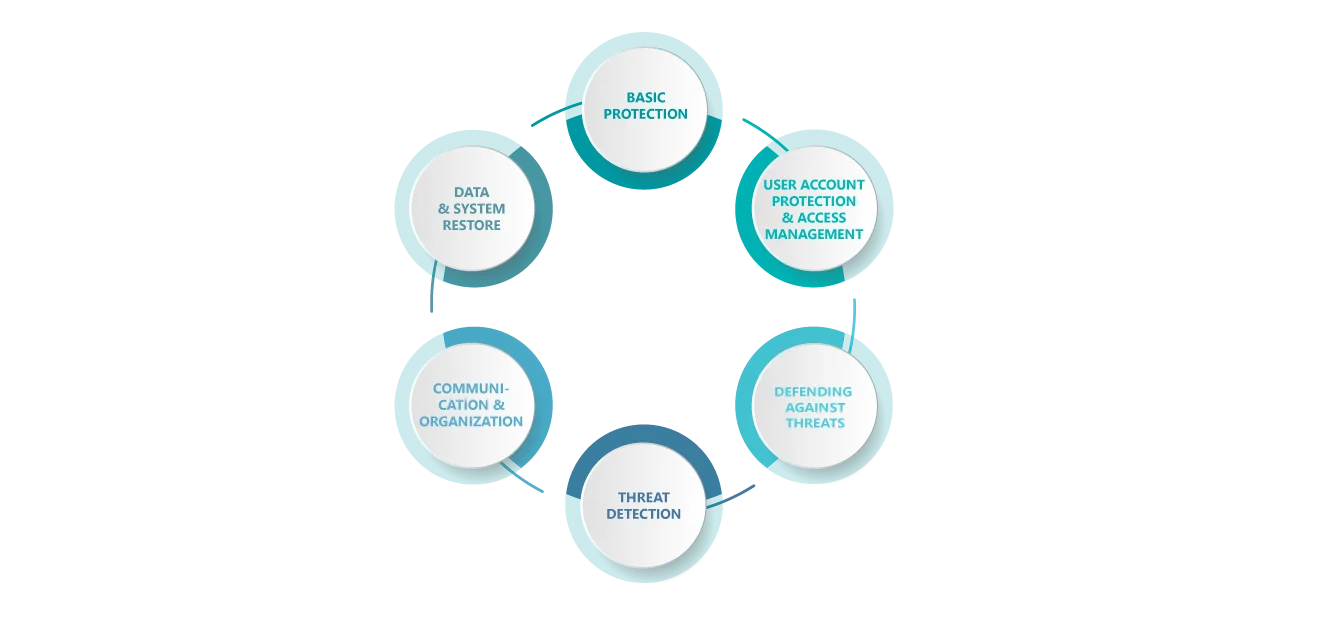
Analysis
Security check: a structured analysis of your current IT systems
We will determine the current state of your IT systems by carrying out a security check that covers six key areas:
When performing our security check, we test your services and systems with the help of a matrix: we assign items such as on-prem servers, Microsoft 365, Azure, SaaS applications and other platforms to the 6 security categories described above and evaluate them in a structured way. That way, you can see at a glance which security categories are in good shape and which require further action. In this case, the checklist is deliberately expandable. Whenever new departments or services are added (such as additional cloud workloads or SaaS solutions), the evaluation can be specifically updated.
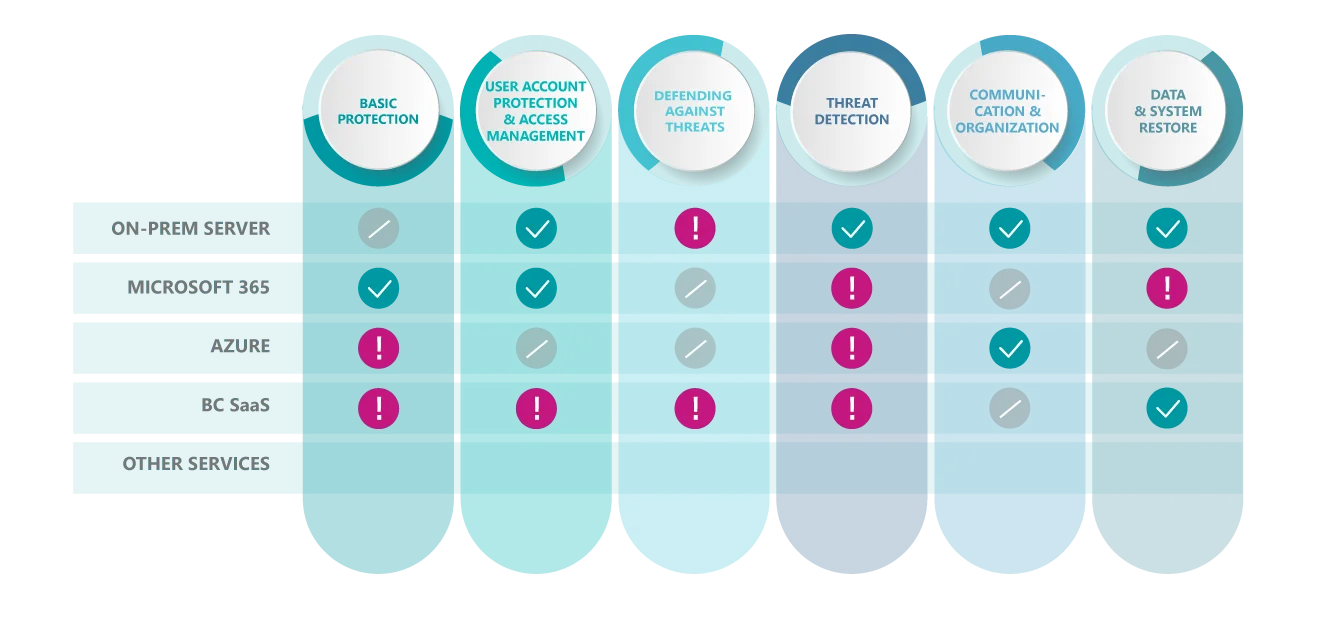
Note: When performing our security audits, we focus on architecture and configuration reviews and action planning. Our portfolio of services does not include penetration tests.
Areas tested
What we typically check during a security audit
When carrying out the security audit, we look at the security-related components of your IT infrastructure – from user accounts and access rights and cloud and on-prem systems to backups, detection and emergency procedures. That way, we can quickly identify where your IT already offers good protection and where the next steps will have the biggest effect. Depending on how your systems are used, we will look at items such as:
Logging on, multi-factor authentication (MFA), roles and admin rights
Basic security settings, access protection and central guidelines
Servers, directory service (active directory), update status and basic protection (hardening)
Device protection, security guidelines and device status (compliance)
How backups are protected, restorability and restore testing should an incident occur
Records/logs, alerts and who will respond to what and when?
Checking roles and responsibilities, as well as communication and escalation routes. Evaluating whether the necessary processes for these are in place and have been set up in a sensible way.
How a security audit is carried out: 4 steps that lead to an action plan
What you will get at the end
Once the security audit is complete, we will have provided you with:
Making technologies usable
Introducing unitop securely: Microsoft Security as a stable foundation
unitop is our end-to-end business solution based on Microsoft Dynamics 365 Business Central. That actually gives you one major advantage: to ensure secure implementation and operation, we can rely on established Microsoft Security mechanisms and tried-and-tested best practices, especially in conjunction with Microsoft 365 and Azure. That way, your unitop environment can be secured right from the start and aligned to your existing infrastructure (on-prem, hybrid or cloud).
During the audit, we take typical security requirements into account at an early stage, including:
These are what make the security audit a stable foundation that ensures that unitop is introduced securely and used reliably during day-to-day operations.
Contact
Requesting a security audit – Your contact
Would you like to know where you stand – and what steps will truly be effective? We’ll be pleased to advise you and find the right approach for your environment.